
La localisation de sites web est un effort collaboratif. Entre les chefs de projet qui configurent les paramètres, les développeurs qui vérifient le code et les traducteurs humains qui révisent le texte, vous avez besoin d'un espace de travail centralisé où toute votre équipe peut fonctionner sans heurts.
MultiLipi vous permet d'inviter plusieurs utilisateurs dans votre espace de travail et de leur attribuer des rôles spécifiques pour garder votre pipeline de localisation sécurisé et organisé.
Mise à jour importante : Le nouveau flux d'invitation intégré à l'application
Pour renforcer la sécurité, prévenir le hameçonnage et veiller à ce que les invitations ne se perdent jamais dans les dossiers de spam, MultiLipi a abandonné les invitations par e-mail. Toutes les invitations d'équipe sont désormais gérées directement dans le tableau de bord de MultiLipi. Cela rend l'ensemble du processus d'intégration plus rapide, plus sûr et plus fiable pour toutes les tailles d'équipe.
Prérequis : La personne invitée doit posséder un compte
Une étape rapide avant d'envoyer l'invitation.
Étant donné que les invitations sont envoyées via le tableau de bord, la personne que vous invitez doit d'abord créer un compte MultiLipi gratuit en utilisant l'adresse e-mail exacte à laquelle vous prévoyez d'inviter.
Une fois qu'ils se sont inscrits et connectés sur le tableau de bord MultiLipi, vous pouvez procéder aux étapes ci-dessous.
Phase 1 : Comment envoyer une invitation d'équipe
Pour les propriétaires et administrateurs d'espace de travail.
Accéder au tableau de bord de l'équipe
Connectez-vous à votre compte MultiLipi. Dans le panneau de navigation de gauche, cliquez sur l'onglet Équipe pour ouvrir la zone de gestion des membres de votre espace de travail.
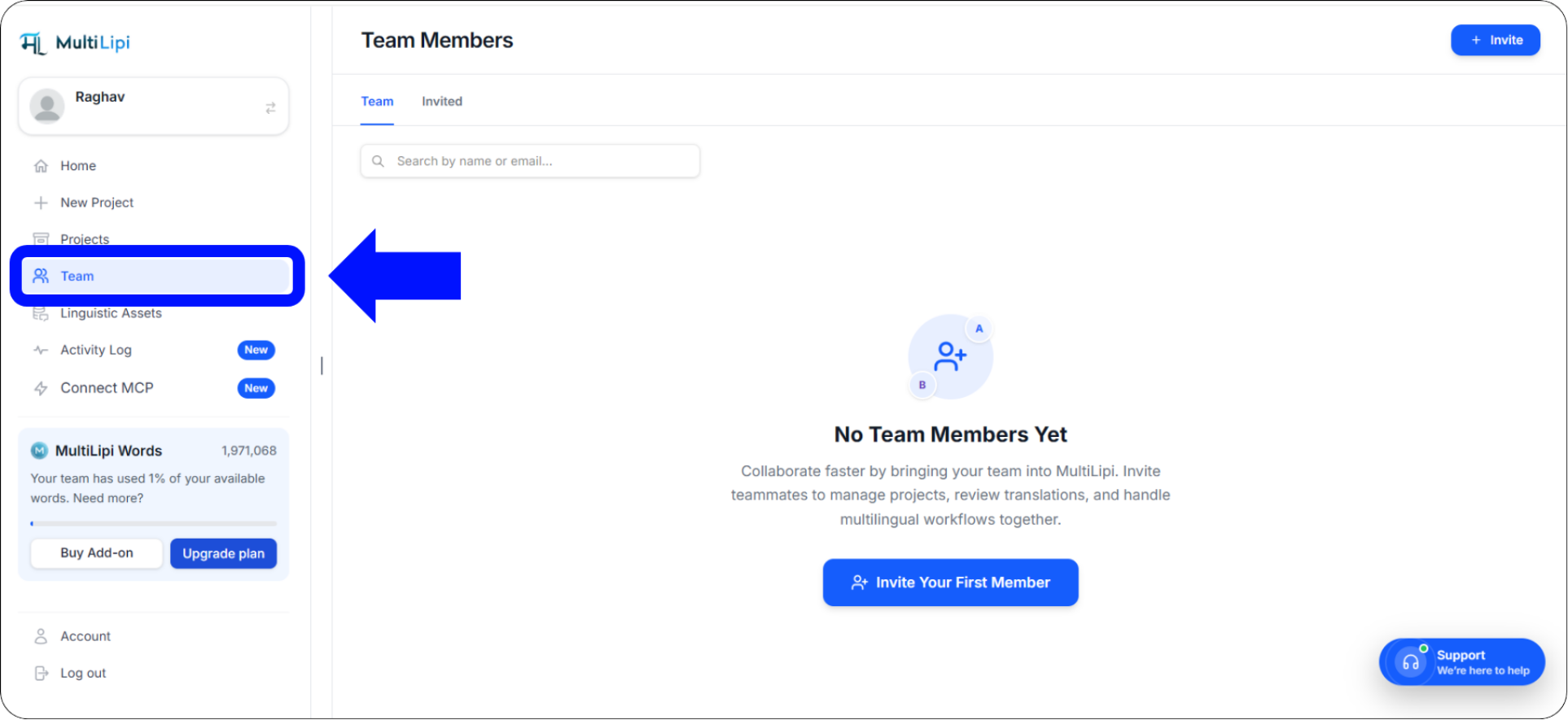
L'onglet Équipe dans le panneau de navigation de gauche — votre centre de gestion des membres de l'espace de travail
Initier l'invitation
Si votre espace de travail est actuellement vide, cliquez sur le bouton bleu proéminent Inviter votre premier membre au centre de l'écran.
Si vous avez déjà des membres, cliquez sur le bouton + Inviter dans le coin supérieur droit du tableau de bord de l'équipe.
Configurer les détails et les autorisations de l'utilisateur
Un "Inviter des membres de l'équipe" une fenêtre contextuelle apparaîtra. Remplissez les détails suivants :
Identifiant e-mail du membre
Saisissez l'adresse e-mail exacte que votre collègue a utilisée pour s'inscrire sur MultiLipi. La moindre erreur de frappe entraînera l'échec de l'invitation.
Sélectionner le rôle
Choisissez leur niveau d'autorisation — Administrateur pour un accès complet, ou Contributeur pour un accès axé sur la traduction sans contrôle des paramètres du compte.
Accès à des projets spécifiques
Par défaut, les utilisateurs invités ont accès à tous les projets de votre espace de travail. Cochez cette case si vous souhaitez uniquement qu'ils accèdent à des sites Web spécifiques au sein de votre compte.
Envoyer l'invitation
Vérifiez les détails une dernière fois, puis cliquez sur le bouton bleu Envoyer l'invitation bouton. L'invitation apparaîtra instantanément dans le tableau de bord MultiLipi de votre collègue — aucun e-mail requis.
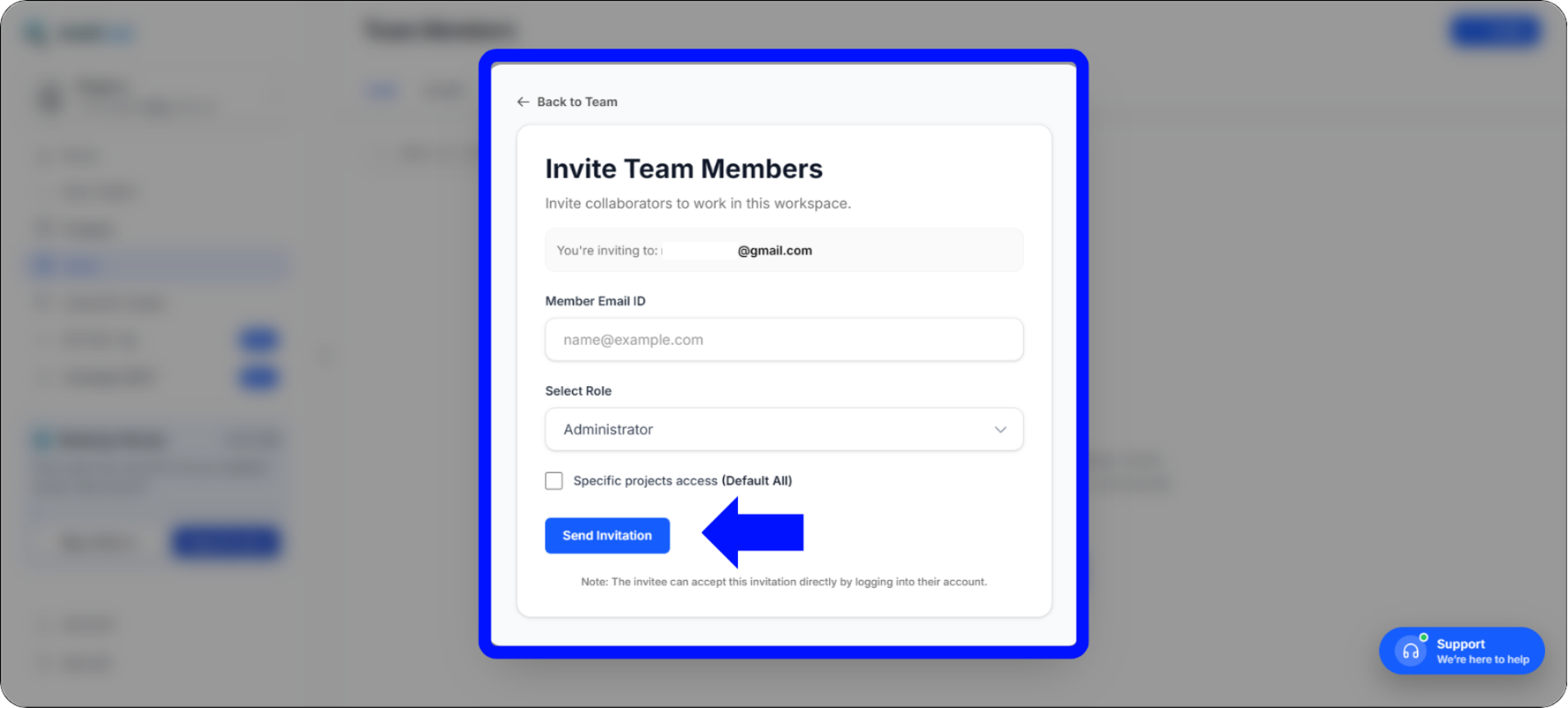
Fenêtre modale d'invitation de membres de l'équipe — configurez l'e-mail, le rôle et l'accès au projet avant l'envoi
Phase 2 : Comment accepter une invitation d'équipe
Pour le membre de l'équipe invité — seulement deux clics.
Si vous êtes le membre de l'équipe recevant l'invitation, rejoindre l'espace de travail ne prend que deux clics — pas de confirmation par e-mail, pas d'expiration de lien, pas de recherche dans le dossier spam.
Vérifiez les notifications de votre tableau de bord
Connectez-vous à votre compte MultiLipi. Regardez le panneau de navigation de gauche — vous verrez un badge de notification rouge avec un numéro à côté de l'onglet Équipe Cet indicateur signale les invitations d'espace de travail en attente de votre réponse.
Acceptez l'invitation
Cliquez sur le Équipe En haut de l'écran, vous verrez une bannière bleue intitulée Invitations d'espace de travail — elle indique qui vous a invité et le rôle qui vous a été attribué.
Cliquez sur le bleu Rejoindre pour vous connecter instantanément à l'espace de travail et accéder à vos projets assignés.
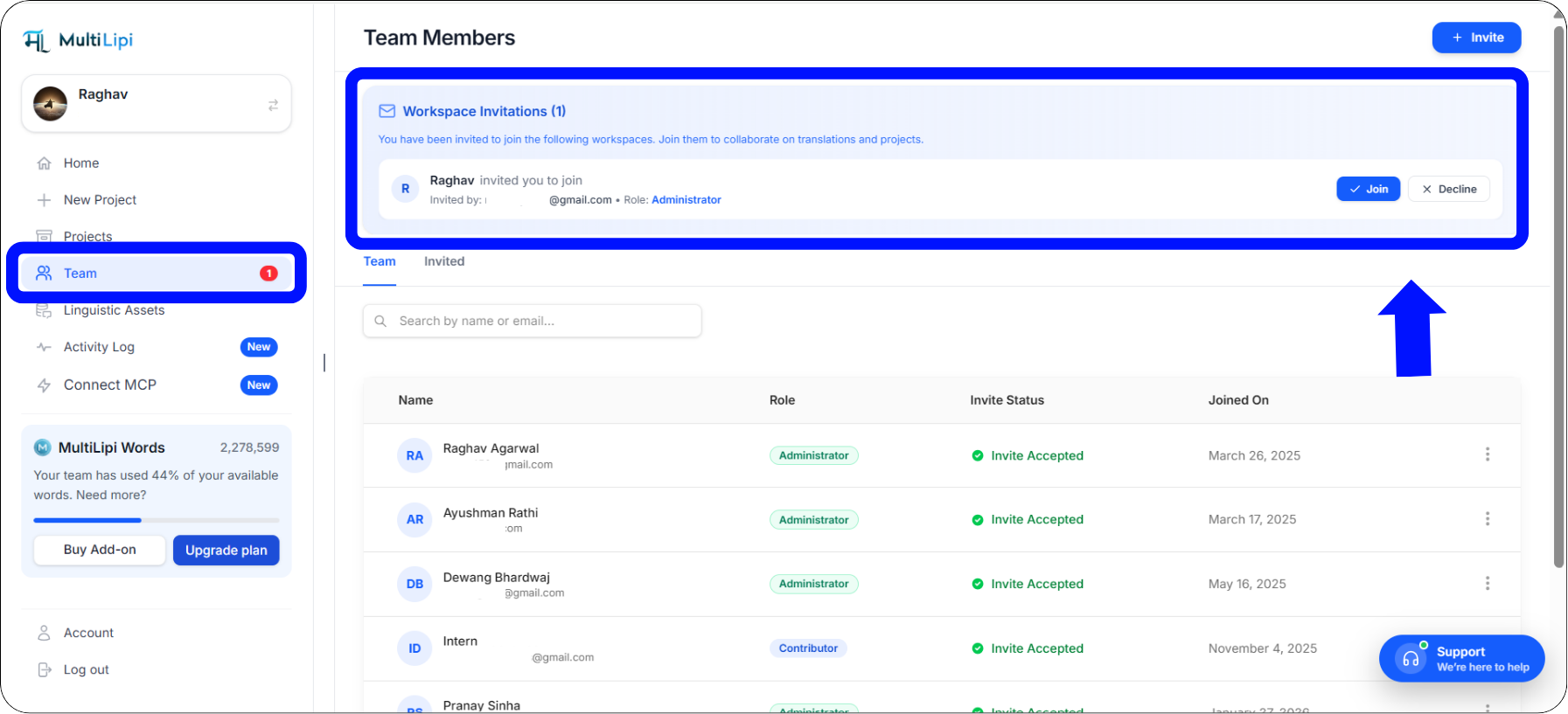
La bannière d'invitations d'espace de travail — acceptez en un seul clic sur le bouton Rejoindre
Phase 3 : Modification des rôles ou suppression des membres
Les administrateurs conservent le contrôle total à tout moment.
À mesure que votre équipe s'agrandit ou que ses responsabilités évoluent, les administrateurs de l'espace de travail conservent le contrôle contrôle total sur l'accès à la plateforme. Vous pouvez modifier le rôle d'un utilisateur ou le supprimer complètement à tout moment — les modifications prennent effet immédiatement.
Accédez à l'onglet Équipe pour afficher la liste active des membres actuels.
Recherchez le membre de l'équipe que vous souhaitez modifier dans la liste.
À l'extrême droite de sa ligne, cliquez sur les trois points verticaux (⋮) pour ouvrir le menu d'actions.
Sélectionnez Modifier pour modifier son rôle attribué ou son accès au projet, ou sélectionnez Supprimer pour révoquer immédiatement son accès à votre espace de travail.
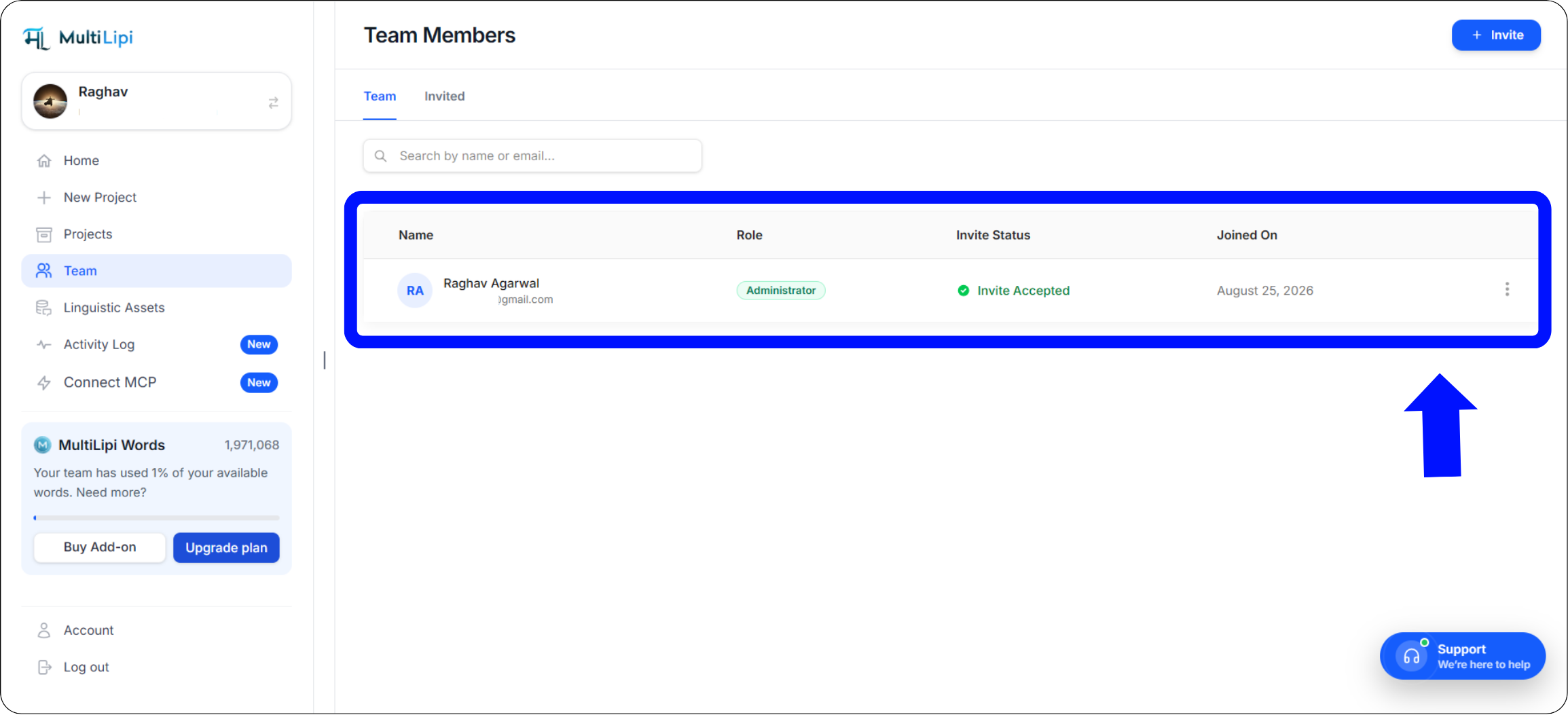
Le menu d'actions à trois points sur la ligne de chaque membre — Modifier le rôle/l'accès ou Supprimer pour révoquer immédiatement
Bonnes pratiques pour la gestion d'équipe
Sécurisez votre espace de travail et organisez votre pipeline.
Appliquer le principe du moindre privilège
Lors de l'attribution des rôles, donnez toujours aux membres de l'équipe le niveau d'accès minimal nécessaire pour effectuer leur travail — rien de plus.
Traducteurs humains et sous-traitants externes
Accès complet aux Éditeur visuel et aux Listes de traduction — sans possibilité de modifier les paramètres du domaine, les configurations DNS ou les détails de facturation.
Chefs de projet principaux et responsables techniques
Accès complet à l'espace de travail, y compris les paramètres du projet, la configuration DNS, la facturation et la gestion de l'équipe. Réservez ceci uniquement aux responsables internes de confiance.
Dépannage des problèmes courants d'invitation
Résolutions rapides pour les scénarios d'intégration d'équipe les plus fréquents.
« Mon coéquipier s'est connecté, mais ne voit pas l'invitation. »
Cela se produit presque toujours lorsqu'il y a une faute de frappe dans l'adresse e-mail, ou que le coéquipier s'est inscrit en utilisant un alias d'e-mail différent (par exemple, en utilisant un Gmail personnel au lieu de son e-mail professionnel). Vérifiez l'adresse e-mail exacte qu'ils ont utilisée pour enregistrer leur compte MultiLipi, et renvoyez l'invitation à cette adresse spécifique.
« Comment puis-je annuler une invitation en attente ? »
Si vous avez envoyé une invitation à la mauvaise personne ou attribué le mauvais rôle, revenez simplement à votre onglet Équipe. Localisez l'utilisateur en attente sous le statut "Invité", cliquez sur les trois points verticaux à côté de son nom, et sélectionnez Supprimer pour révoquer l'invitation avant qu'il ne puisse l'accepter.
Un membre peut-il appartenir à plusieurs espaces de travail ?
Oui ! Les traducteurs indépendants, les spécialistes SEO ou les partenaires d'agence peuvent utiliser une seule connexion MultiLipi pour accepter des invitations de plusieurs espaces de travail clients différents. Ils peuvent basculer de manière transparente entre ces espaces de travail distincts depuis leur tableau de bord de compte principal sans avoir besoin de mots de passe séparés.
Résumé : Rationalisez votre flux de travail mondial
Collaboration d'équipe sécurisée, rapide et organisée — intégrée.
La gestion d'un site Web multilingue ne devrait pas nécessiter d'innombrables échanges d'e-mails, de feuilles de calcul désordonnées ou de partage de mots de passe de compte sensibles. En utilisant le tableau de bord de gestion d'équipe centralisé de MultiLipi, vous établissez un environnement sécurisé et organisé où les développeurs peuvent gérer les intégrations DNS techniques, tandis que les linguistes et les spécialistes du marketing se concentrent uniquement sur le perfectionnement des traductions dans le Éditeur visuel.
Notre transition vers un flux d'invitation entièrement intégré à l'application garantit que l'intégration de votre projet reste hautement sécurisée, immunisée contre les filtres anti-spam agressifs par e-mailet incroyablement rapide — de l'invitation à la collaboration active en quelques secondes.
Prêt à réunir votre équipe de localisation ?
Rendez-vous sur votre onglet Équipe aujourd'hui et invitez votre premier collaborateur. Explorez ces ressources pour maximiser la production de votre équipe sur chaque marché :
Besoin d'aide pour une configuration d'équipe personnalisée ? Pour les espaces de travail à l'échelle de l'entreprise avec des exigences de rôles complexes ou des besoins SSO, contacter le support MultiLipi — notre équipe vous aidera à configurer la bonne structure d'accès pour votre organisation.