

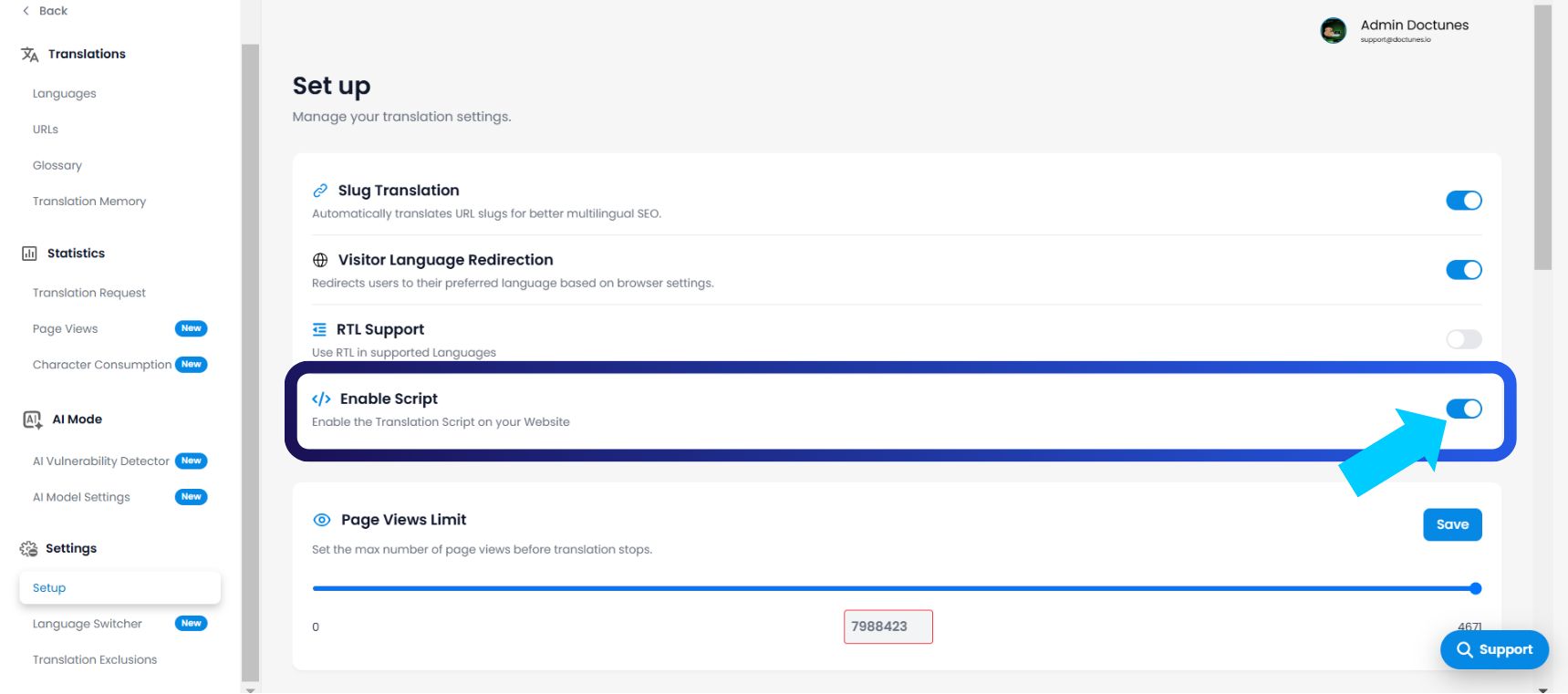
Le "Script de traduction" est l'agent exécutable qui livre votre contenu localisé. Par défaut, MultiLipi injecte cet agent immédiatement après la configuration pour assurer un déploiement rapide. Cependant, vous gardez le contrôle absolu de ce flux. Vous pouvez activer ou désactiver le Activer le script commutateur pour activer ou interrompre instantanément la connexion entre votre site Web et notre moteur de traduction.
Ce guide détaille les états opérationnels et le protocole de gestion de ce contrôle maître.
1. Les états d'injection
Comprendre les modes actif et dormant.
Statut : ACTIVÉ (Injection active)
Comportement : La charge utile JavaScript s'exécute à chaque chargement de page.
Expérience utilisateur : Les visiteurs voient le sélecteur de langue et le contenu traduit.
Télémétrie : Les vues de page et la consommation de caractères sont activement suivies et déduites de votre quota.
Statut : DÉSACTIVÉ (Mode dormant)
Comportement : Le script est supprimé à la source. Il ne se charge pas dans le navigateur de l'utilisateur.
Expérience utilisateur : Les visiteurs ne voient que votre site Web d'origine (source), tel qu'il existe sur votre serveur.
Télémétrie : Consommation de quota nulle. Aucun appel API n'est effectué.
2. Protocole de configuration
Accès au bouton d'arrêt d'urgence.
Pour modifier l'état d'injection, suivez ce chemin de navigation spécifique dans votre centre de commande :
Étape 1 : Accéder au tableau de bord
Connectez-vous à votre tableau de bord MultiLipi.
Étape 2 : Sélection du projet
Depuis le menu de gauche, accédez à Projets.
Sélectionnez le projet/site Web spécifique que vous souhaitez gérer.
Étape 3 : Accéder à la configuration
Dans le panneau de gauche, localisez le Paramètres section.
Cliquez sur Configuration.
Étape 4 : Basculer l'état
Faites défiler pour trouver le bouton bascule intitulé Activer le script.
Action : Activez ou désactivez l'interrupteur.
Latence : La modification se propage immédiatement vers le bord.
3. Cas d'utilisation opérationnels
Quand tirer la prise.
Pourquoi désactiver un service pour lequel vous avez payé ? Cette fonctionnalité est essentielle pour les flux de travail DevOps et budgétaires :
Staging & Refonte : Si vous déployez une mise à jour majeure du code sur votre site principal, désactivez le script pour éviter que le moteur de traduction n'essaie de traduire des structures HTML cassées ou inachevées.
Défense de quota : Si vous approchez de la limite de votre forfait (par exemple, 98 % des vues de page utilisées) et que vous ne souhaitez pas encore passer à un niveau supérieur, désactivez le script pour éviter les frais de dépassement jusqu'au prochain cycle de facturation.
Mode furtif (Avant lancement) : Vous pouvez laisser le script désactivé pendant que votre équipe examine manuellement les traductions dans le tableau de bord. Une fois la phase d'assurance qualité terminée, activez le commutateur pour la mise en ligne.
4. Nuances techniques
Comprendre les implications.
Persistance des données : La désactivation du script n'est pas destructive. Elle ne supprime pas votre mémoire de traduction, votre glossaire ou les paramètres de votre projet. Vos données restent figées jusqu'à ce que vous réactiviez le service.
Portée du projet : Il s'agit d'un paramètre au niveau du projet. La désactivation du script sur "Site A" n'affecte pas le statut en direct de "Site B".
Proxys personnalisés : Pour les utilisateurs d'entreprise qui exécutent des intégrations proxy manuelles, la désactivation de ce commutateur empêche les conflits de "double injection" pendant le débogage.