
En typographie globale, "Directionnalité" est essentiel. Des langues comme l'arabe et l'hébreu se lisent de droite à gauche (RTL). Si vous traduisez simplement le texte sans inverser la mise en page, l'expérience utilisateur semble défectueuse (par exemple, le texte est aligné à gauche, la ponctuation est mal placée).
MultiLipi Moteur RTL est une couche de style dynamique qui détecte ces langues et "miroir" automatiquement le CSS de votre site Web — inversant les marges, le rembourrage et l'alignement du texte — pour garantir une expérience de lecture native sans que vous ayez à écrire une seule ligne de code personnalisé.
1. Le Protocole de Détection
Quelles langues déclenchent le changement ?
Le moteur est sensible au contexte. Il n'active le miroir de la mise en page que lorsqu'un utilisateur sélectionne une langue RTL désignée. Pour toutes les autres langues (anglais, français, etc.), le rendu standard de gauche à droite (LTR) reste actif.
Langues RTL Supportées :
Arabe (ar)
Hébreu (lui)
Persan / Farsi (fa)
Ourdou (votre)
2. Protocole de configuration
Activation du moteur de miroir.
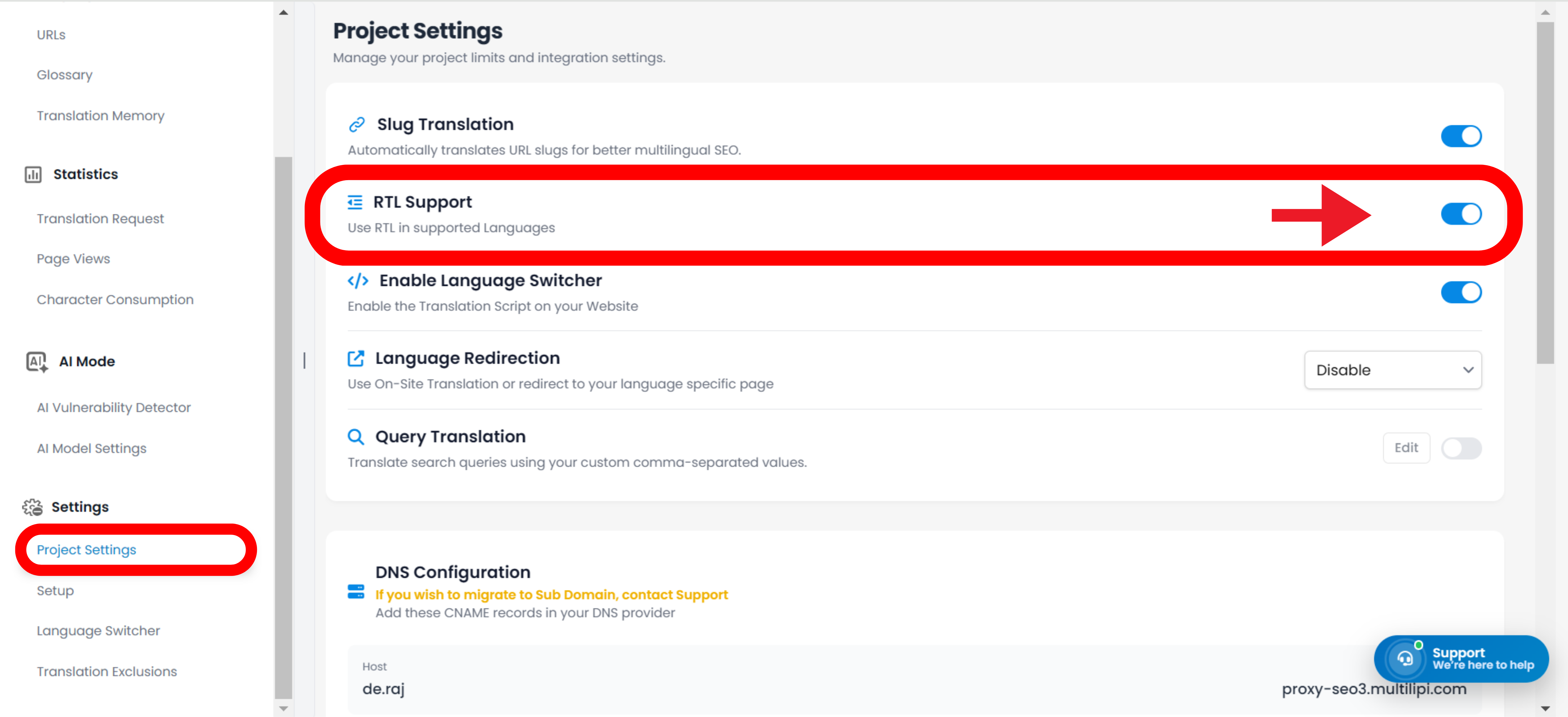
Pour activer cette adaptation structurelle, suivez ce chemin dans votre centre de commande :
Étape 1 : Accéder au Contexte du Projet
Connectez-vous à votre tableau de bord MultiLipi.
Sélectionnez le projet spécifique que vous souhaitez configurer.
Étape 2 : Accéder à la configuration
Naviguer vers les Paramètres section dans la barre latérale gauche.
Cliquez sur Paramètres du projet.
Étape 3 : Activer le moteur
Faites défiler pour trouver le Support RTL basculer.
Action : Le basculer sur ACTIVÉ (Bleu).
Action du Système : La couche d'injection CSS est maintenant active.
3. Comportement Technique
Comment cela fonctionne dans le navigateur.
Une fois activé, le moteur effectue dynamiquement les opérations suivantes :
Attribut de direction
Injecte automatiquement dir="rtl" dans le HTML <html> balise lorsque qu'une langue RTL est active.
CSS Flipping
Il "inverse" virtuellement les propriétés CSS standard.
flottant: gauche devient flottant: droite.
marge-gauche: 10px devient marge-droite: 10px.
Intégration du commutateur
Si vous utilisez le sélecteur de langue MultiLipi, l'interface utilisateur inversera instantanément son orientation dès qu'un utilisateur sélectionne l'arabe ou l'hébreu, offrant une transition transparente.
Remarque : Aucune surcharge CSS manuelle n'est requise. Le système gère les calculs de géométrie automatiquement.