
Chaque pixel de votre site Web ne nécessite pas de localisation. Les clauses de non-responsabilité légales doivent souvent rester dans la langue de leur juridiction d'origine ; les extraits de code doivent rester en anglais ; et les routes d'administration ne doivent jamais être indexées.
MultiLipi fournit un Système d'exclusion à trois niveaux—URL, Bloc et Mot— vous donnant une précision chirurgicale sur ce que l'IA ignore.
Les trois niveaux d'exclusion
Avant de configurer les règles, comprenez le niveau de contrôle dont vous avez besoin :
Niveau de Page (Règles d'URL)
Action : Désactive complètement la traduction pour une page entière ou un répertoire.
Cas d'utilisation : Panneaux d'administration (/app/*), Paramètres utilisateur, ou Conditions Générales en anglais "Légalement contraignantes".
Niveau composant (Règles de blocage)
Action : Ignore le contenu à l'intérieur d'éléments HTML spécifiques (divs, spans) en fonction de leur classe CSS.
Cas d'utilisation : Blocs de code (), les noms propres dans les en-têtes, ou les widgets tiers complexes.
Niveau de Terme (Règles de mots)
Action : Empêche le traitement de correspondances de chaînes spécifiques.
Cas d'utilisation : Numéros de modèle de produit ou jargon technique non traduisible.
Accéder au Moteur de Gouvernance
Pour définir votre logique négative :
- Naviguer : Ouvrez votre tableau de bord MultiLipi et sélectionnez votre projet actif.
- Localiser les paramètres : Dans la barre latérale, faites défiler vers le bas jusqu'à Paramètres et sélectionnez Exclusions de traduction.
- Interface : Vous verrez une liste des règles actives séparées par catégorie (URL, Blocs, Mots).
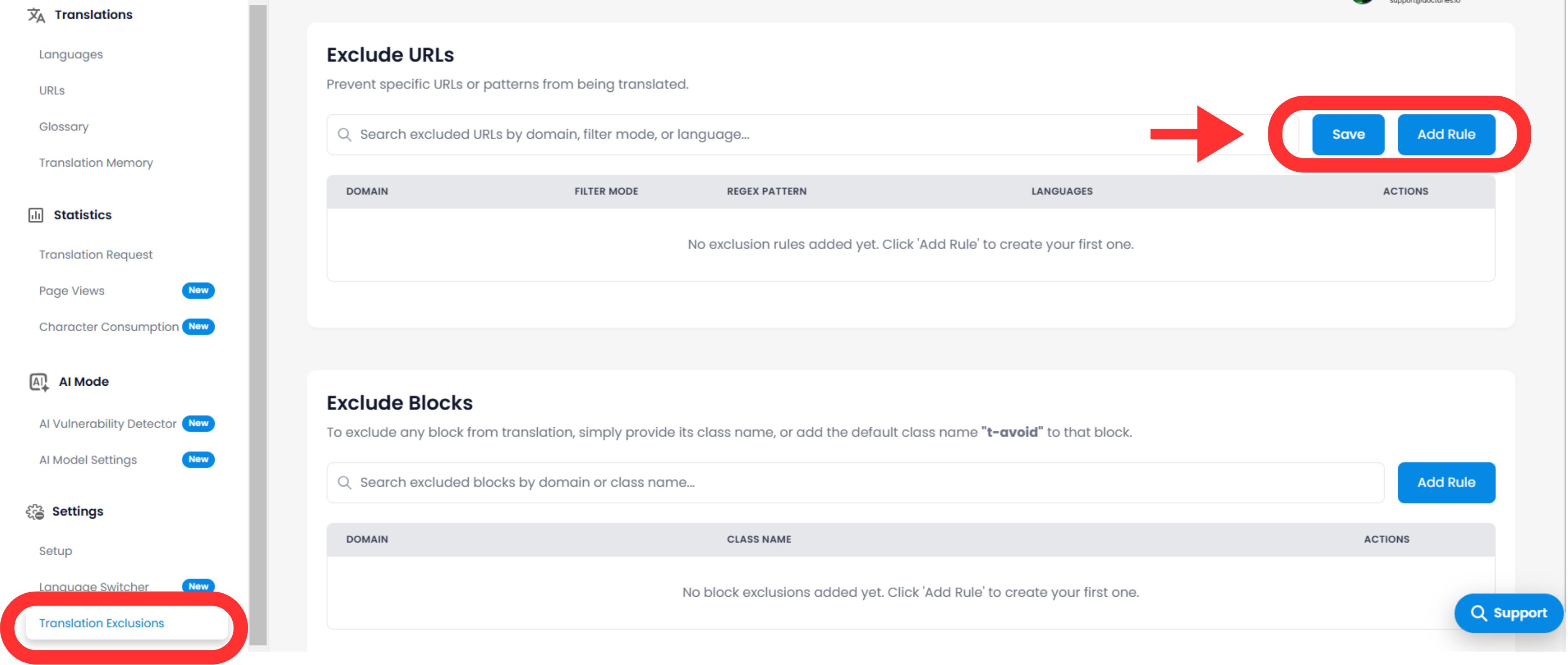
Configuration des règles logiques
Cliquez sur le Ajouter une règle bouton pour définir une nouvelle contrainte.
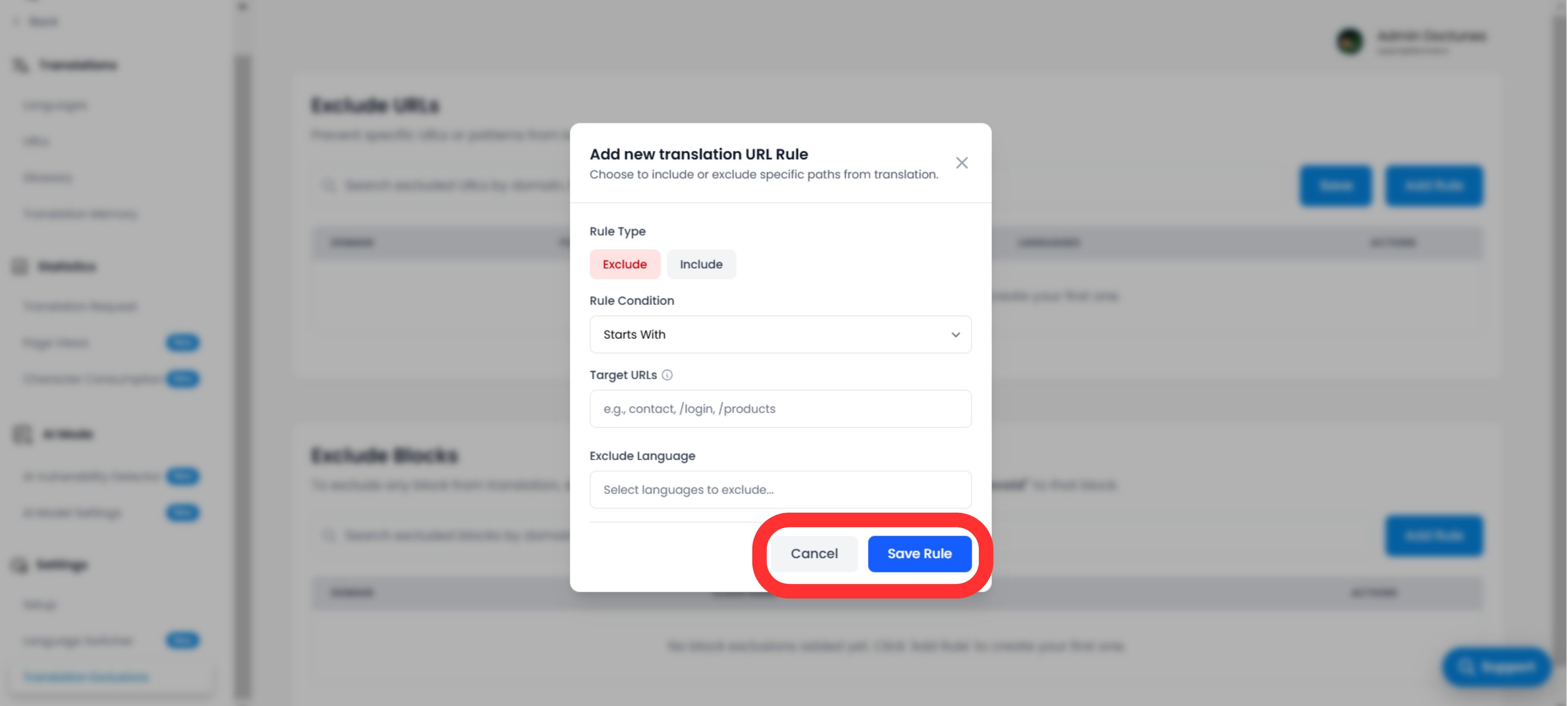
A. Définition du modèle
Vous devez indiquer au moteur comment faire correspondre le contenu :
Type de règle :
- •Commence par : Idéal pour les annuaires (par exemple,
/blog/exclut tous les articles de blog). - •Se termine par : Idéal pour les types de fichiers (par exemple,
.pdf). - •Contient : Correspondance générique pour toute URL contenant une chaîne spécifique.
- •Correspondance exacte : Cible une seule page spécifique.
Valeur :
Entrez le chemin, le nom de la classe CSS (sans le .), ou mot.
B. Portée et comportement
Langues :
Appliquer la règle globalement (Toutes les langues) ou restreignez-le à des locales spécifiques (par exemple, Exclure /tarifs uniquement en français).
Visibilité du sélecteur (UX critique)
Basculer : "Masquer le sélecteur de langue"
Impact : Si vous excluez une page (comme un écran de connexion), vous voudrez probablement masquer le sélecteur de langue sur cette page afin que les utilisateurs n'essaient pas de changer de langue et ne voient rien se passer. Ce commutateur automatise ce nettoyage de l'expérience utilisateur.
Exécution et vérification
Une fois que vous cliquez sur Enregistrer la règle:
Propagation immédiate
La règle est immédiatement poussée vers le réseau périphérique.
Purge du cache
Nous purgeons automatiquement le cache pour les chemins affectés afin de garantir que la version "non traduite" soit servie immédiatement.
Cas d'utilisation stratégiques
| Type de règle | Scénario | Configuration |
|---|---|---|
| Règle d'URL | Tableau de bord utilisateur : Vous souhaitez que le site public soit traduit, mais l'application connectée (/app/...) pour rester en anglais. | Type : Commence par Valeur : /app/ |
| Règle de blocage | Extraits de code : Vous gérez un blog de développement et souhaitez que le texte du tutoriel soit traduit, mais que les exemples de code restent du code valide. | Type : Classe CSS Valeur : code-snippet |
| Règle d'URL | Légal régional : Vos Conditions Générales ne sont valides qu'en anglais. | Type : Correspondance exacte Valeur : /terms |