

Localisez vos permaliens pour une visibilité organique et un CTR maximum.
Dans SEO International, votre structure d'URL est le premier signal que l'utilisateur voit dans les résultats de recherche. Si votre contenu est en espagnol mais que votre URL reste en anglais (par exemple, /es/pricing), vous créez un " décalage linguistique " qui réduit la confiance et le taux de clics (CTR).
MultiLipi Moteur de traduction de slugs élimine cette friction. Il traduit automatiquement les segments d'URL (slugs) dans la langue cible, garantissant que votre architecture de routage correspond à votre contenu.
- Anglais :
example.com/tarifs - Espagnol :
example.com/es/precios - Allemand :
example.com/de/preise
1. L'avantage SEO
Pourquoi localiser votre couche de routage ?
Pertinence des mots-clés
Les moteurs de recherche mettent en évidence les mots-clés dans l'URL. La traduction du slug place vos mots-clés cibles (par exemple, "precios") directement dans le lien, améliorant le classement pour les requêtes locales.
Fluidité cognitive
Une URL entièrement localisée semble native. Elle signale à l'utilisateur, "Cette page est en fait pour moi," plutôt que "Ceci est juste une copie traduite automatiquement."
Cohérence de la structure
Il aligne vos fil d'Ariane et l'architecture de votre site, créant une hiérarchie logique pour les robots d'exploration.
2. Protocole de configuration
Activation du moteur de routage.
Pour activer la traduction automatique des chemins, suivez ces étapes dans votre centre de commande :
Accéder au contexte du projet
- Connectez-vous à votre Tableau de bord MultiLipi.
- Naviguer vers Projets dans la barre latérale gauche pour afficher vos intégrations actives.
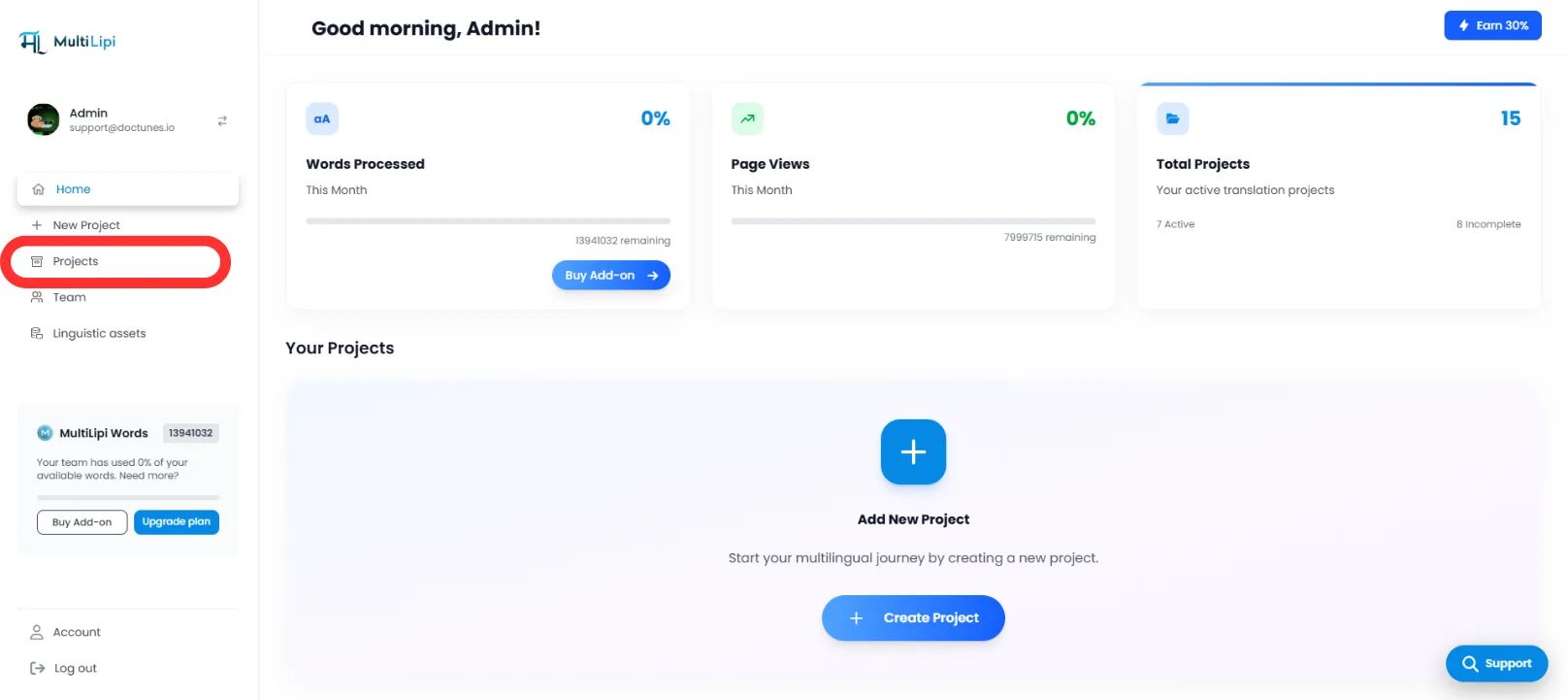
Sélectionner l'architecture cible
- Localisez le projet/site Web spécifique que vous souhaitez configurer.
- Cliquez sur le Onglet Projet souhaité pour accéder à ses paramètres.
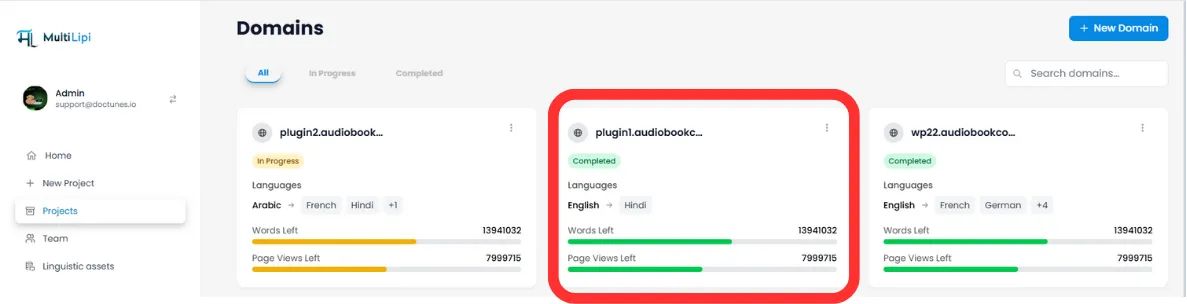
Accéder à la configuration
- Dans le sous-menu du projet (côté gauche), cliquez sur Paramètres.
- Sélectionnez Configuration.
Activer le moteur de slugs
- Faites défiler jusqu'à la Traduction de Slug section.
- Action : Activez le bouton pour ACTIVÉ (Bleu).
- Action du Système : Le moteur interceptera désormais les requêtes d'URL et servira le slug localisé pour toutes les langues cibles.
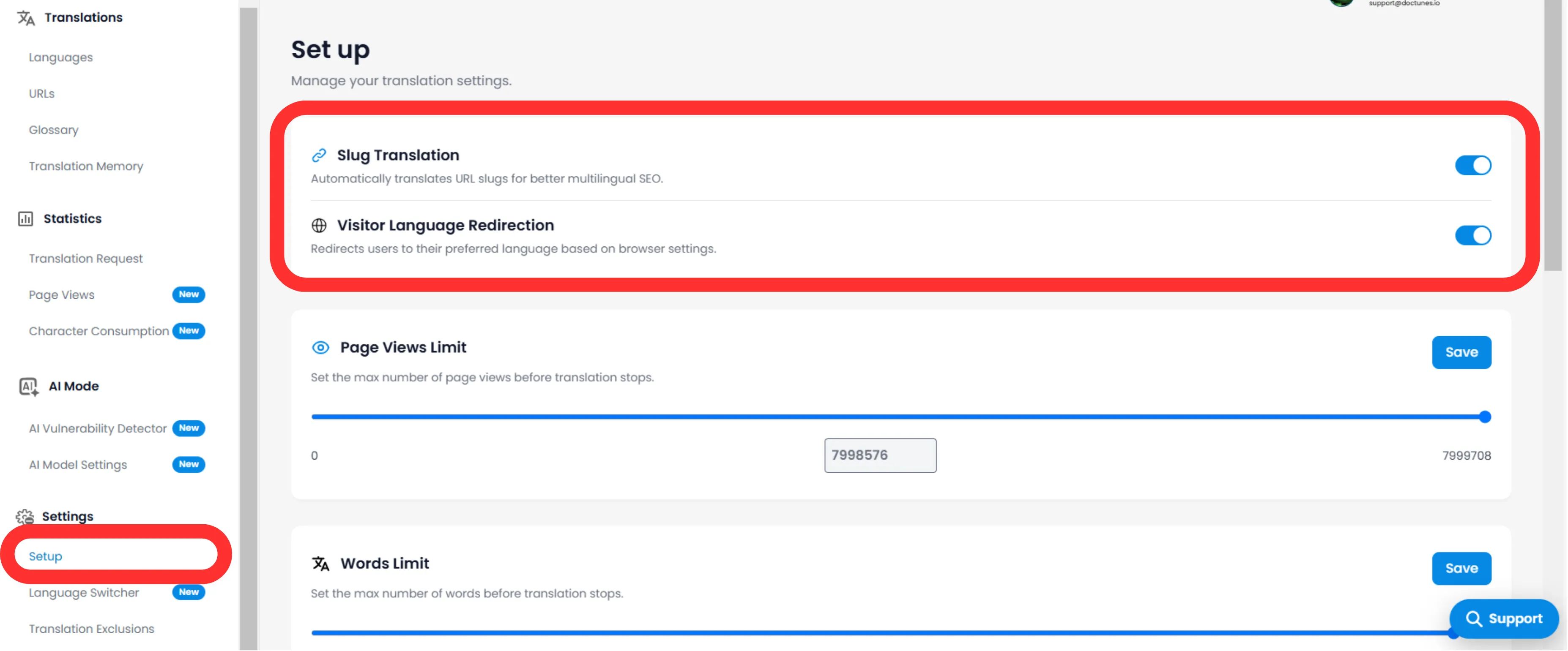
3. Comportement Technique
Comment il gère les redirections.
Une fois activé, le système gère automatiquement le mappage.
Redirections 301
Si un utilisateur (ou un bot) tente d'accéder à l'ancienne URL non traduite ("/es/pricing), MultiLipi redirige automatiquement en 301 vers la nouvelle URL optimisée (/es/precios). Cela préserve votre équité de lien (jus SEO).
Injection de sitemap
Vos sitemaps XML seront automatiquement mis à jour pour lister ces nouvelles URL localisées que Googlebot pourra explorer.
🌐 Localisation automatique des URL : En traduisant vos slugs d'URL, vous créez une expérience internationale transparente qui améliore à la fois le classement SEO et la confiance des utilisateurs sur tous les marchés cibles.